Start with a trigger
Watch mailboxes, folders or databases, accept API requests, or run on a schedule.
Explore triggers
PRIVATE BUSINESS PROCESS AUTOMATION
Turn incoming emails, files, database changes and API events into workflows that run on infrastructure you control.
On-premises or private cloud. Built by Parker Software.

Read · Decide · Act
Deploy on your own server or in your private cloud.
Build workflows in Studio and extend them when needed.
Classify, extract and summarise using your choice of model.






THE PLATFORM
Choose what starts a workflow, decide how to handle it, and send the result where it needs to go.
Watch mailboxes, folders or databases, accept API requests, or run on a schedule.
Explore triggersSet rules, transform data and connect systems with built-in and custom actions.
Meet StudioClassify emails, extract information from documents or connect an assistant to a workflow.
Explore AI automationDEPLOYMENT AND DATA
Install the workflow engine on-premises or in your private cloud. Choose which systems each workflow connects to and which AI provider processes its data.
Explore On-Premises AIWork with the mailboxes, databases, APIs and file stores you already use.
Use a local model for sensitive data, or connect a cloud provider where policy allows.
Inspect processed messages and logs in Studio.

Email automation can be configured to monitor specific email accounts or folders, identify key data points (such as customer inquiries and order details), and automatically populate your database. For example, if your sales team receives order confirmations via email, ThinkAutomation can extract the order details and update your CRM or ERP system without manually entering the data.

Intelligent document processing can scan, read and extract data from various document formats, including PDFs, Word documents and spreadsheets. It uses advanced optical character recognition (OCR) technology to identify and capture relevant information, such as invoice numbers, dates and amounts. Once extracted, the data can be validated, formatted and stored in your preferred system.

Automated workflows can connect to your database and perform a wide range of actions, such as adding new records, updating existing ones, or deleting outdated entries. It can also synchronise data between multiple databases, ensuring consistency across all your systems. For instance, if you have customer data spread across different platforms, ThinkAutomation can consolidate and synchronise it automatically through database automation.

ThinkAutomation can be deployed on your local servers, enabling you to process and analyse data within your own infrastructure using a GPT of your choice. It uses AI and machine learning algorithms provided by the GPT to automate tasks like data classification, anomaly detection and predictive analytics. For example, you can use ThinkAutomation to monitor your on-premises data for unusual patterns and trigger alerts or actions when anomalies are detected.

Automatically monitor your webforms for new submissions, extract the data and send it to the appropriate systems or teams. For example, if a customer fills out a contact form on your website, ThinkAutomation can automatically send the details to your CRM system, notify your sales team and even trigger a follow-up email.

Sales automation software removes the need for the manual processes a sales team would usually have to complete. With these repetitive tasks managed by ThinkAutomation, your sales teams can put their full efforts and expertise behind closing deals and managing leads.
The time savings so far in using ThinkAutomation have been considerable. We’re just scratching the surface of the potential efficiencies the product can provide an enterprise of our size.

ThinkAutomation gives us a significant advantage over our competitors.

ThinkAutomation provides a simple solution to often complex administrative systems.

Simply put, ThinkAutomation is strategic to my company’s operations

It is the glue between all of our disparate software elements, acting kind of like Zapier on steroids.
Since ThinkAutomation doesn’t require a genius programmer, we save a huge amount of cost and get things done for clients quicker. If we have a problem, ThinkAutomation support has always been great. Even suggestions for feature improvements receive a response. our experience has been great.”

Within 30 days, it became obvious this software would be ideal for improving the efficiency of locate requests in Bozeman. The learning curve wasn’t too steep and we were able to get workflows working right away with the help of the user guides provided.

Parker Software offers expert assistance in implementing ThinkAutomation, drawing on over a decade of experience in the industry.
Our process begins with a discovery session to understand your specific business process needs and identify key opportunities for automated workflows.
We then find opportunities to enhance efficiency and reduce costs. We recommend scalable workflows that include using AI for tasks such as data analysis, classification, decision-making, and chatbot integration.
A custom demo will then be provided, led by an experienced technician, to demonstrate how ThinkAutomation directly addresses your identified pain points. We use this to develop a detailed automation plan, outlining clear objectives, timelines, and deliverables to ensure a successful implementation.
Automating tasks and workflows, freeing up your employees’ time from manual tasks and can therefore, focus on higher-value activities.
Process automation can improve customer service by automating customer communications, ensuring prompt responses to enquiries and issues.
Business process automation software reduces the likelihood of errors caused by human input, providing more accurate and reliable data.
Scale your operations without increasing head count. By handling large volumes of data and processes, ThinkAutomation supports business growth.
Automating business processes can significantly reduce operational costs, as it eliminates the need for manual labour and streamlines workflows.
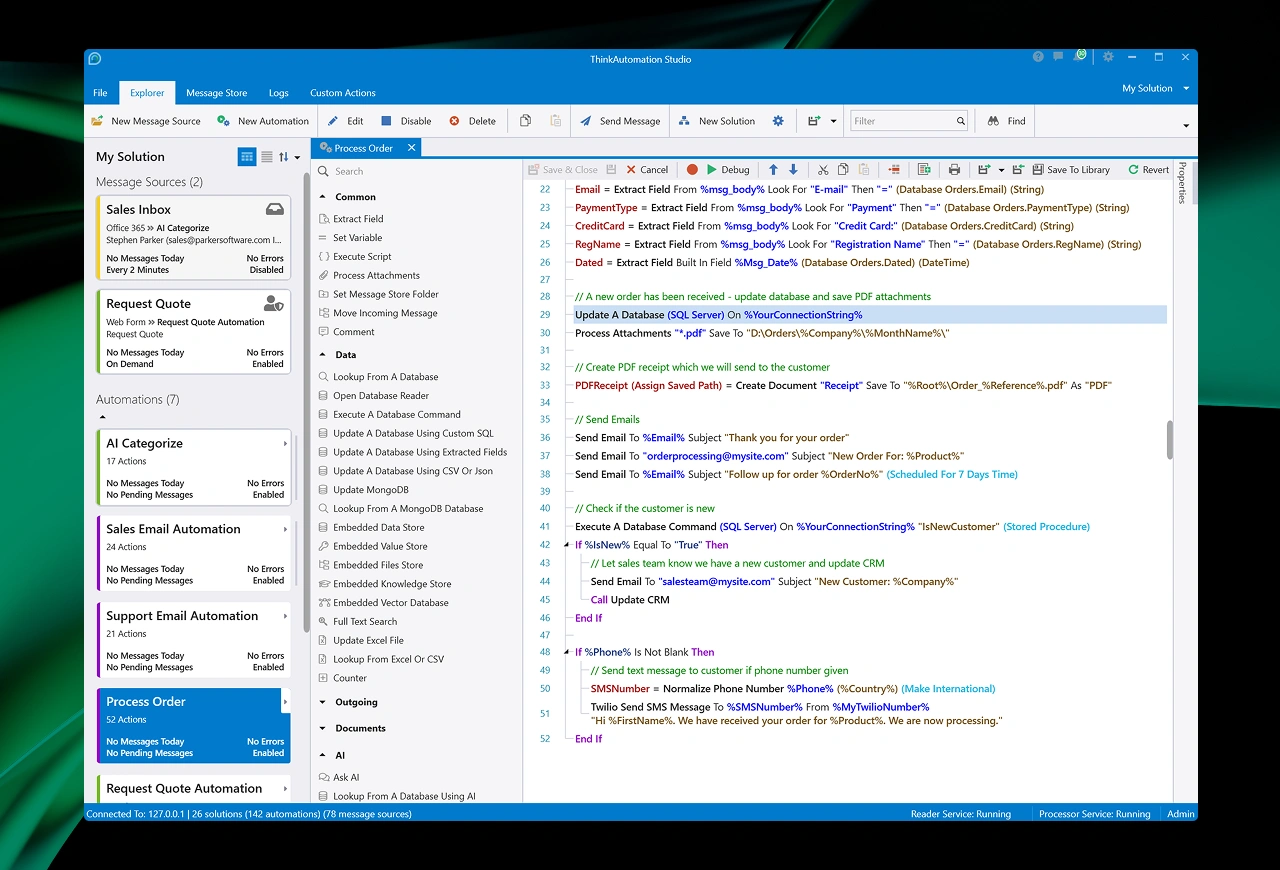
ThinkAutomation’s simple to use, open-ended studio allows you to create custom workflow automations that meet specific business needs and can integrate with your existing systems.