Configure a workflow trigger
Choose what starts your workflow, such as an incoming email, a file change or a schedule.
Explore triggers →
ACTION LIBRARY
Combine built-in actions to process messages and documents, transform records and update other systems. Add custom actions when you need a step of your own.
HOW IT WORKS
Choose what starts your workflow, such as an incoming email, a file change or a schedule.
Explore triggers →Arrange actions in the drag-and-drop Studio designer and test the workflow with sample messages.
Explore the Studio →Enable the trigger to start processing messages automatically.
PRODUCT DETAILS
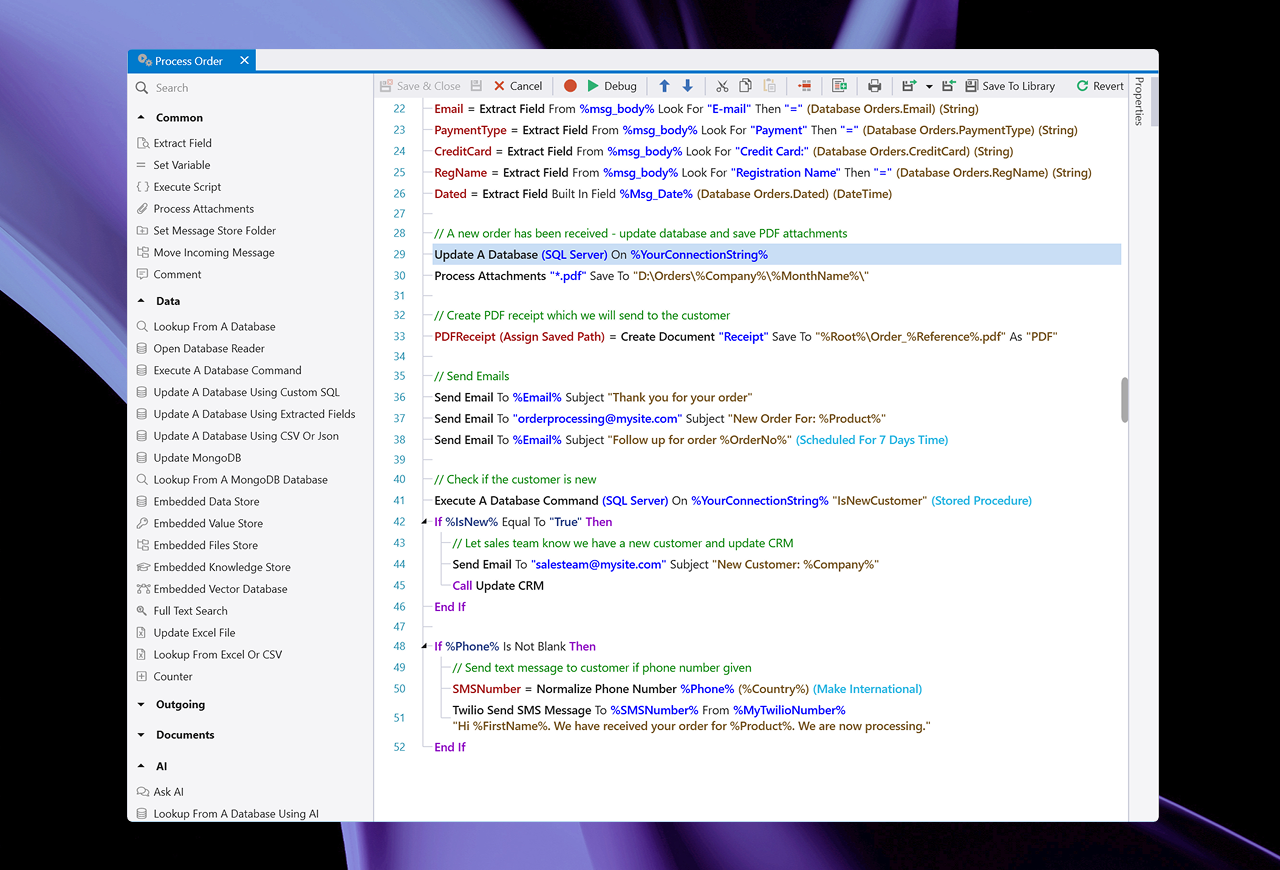
Automation workflows can contain any number of Actions. Conditionally execute actions with ‘If This Then That’ logic rules. Design and test your Automations using the easy to use, drag-and-drop, low-code designer.
Hundreds of built-in automation actions for common tasks are included. Plus, download more from our on-line library.
Plus, use the included Ask AI action to automate AI processing using ChatGPT, Grok or OnVeris. Seamlessly integrating AI-powered decision-making and responses into your automation process.
You can also create your own custom actions using the built-in Custom Action Designer and C# or VB.NET code editor.
Parse and extract data from the incoming message and assign the result to a field name.
Execute custom C# or Visual Basic .NET code.
Automate saving attachments to specific folders on your file system.
Assign the message to a folder in the Message Store.
Move the incoming email message to a different folder on the source email account.
Add a comment line to an Automation and optionally save the comment value to the log.
Execute a SQL database query and assign column values to variables.
Open a database reader for use with a For..Each block.
Execute a database command or stored procedure.
Update or Insert data into a database using custom commands.
Automatically update a SQL database using extracted fields parsed from the incoming message.
Update multiple rows in a SQL database using CSV or Json data.
Create or update MongoDB documents.
Lookup a document from a MongoDB database and assign it to a Variable.
Save and query data using the embedded Document DB.
Save and retrieve a dictionary of key value pairs using the embedded DB.
Save and query files using the embedded DB.
Save and search for knowledge base articles using the embedded DB. Add relevant articles to an AI conversation to provide context.
Store and search vectors linked to text or external data using the embedded vector database.
Save and search text using the built-in full text search database.
Update a Microsoft Excel file. Append new rows or update specific cells.
Lookup specific cell and cell range values from an Excel file and assign to variables.
Update a counter value.
Send an outgoing email immediately or on a scheduled future date.
Remove pending scheduled emails for a given recipient.
Forward the incoming message and optionally add or drop attachments.
Request confirmation from a user before continuing execution.
Creates an appointment in any iCalendar compatible Calendar Server.
Send a message to a Slack channel.
Send a Tweet to Twitter or reply to an incoming Tweet.
Create a formatted document and save it as PDF, Word, HTML and other formats.
Create a spreadsheet and save it as Excel, PDF, CSV or HTML formats.
Convert Word, Open Document, Excel, PDF, Richtext, Text, Markdown Text, CSV or HTML documents or attachments to PDF, Word, HTML, image or text.
Convert PDF, Word, Open Document, Excel, Richtext or HTML documents or attachments to plain text or extract PDF form data.
Convert an image or PDF file or attachment to text using optical character recognition (OCR). Can also extract images from PDF files and convert these to text.
Convert a PDF document or attachment to image files, text or HTML.
Appends document content or text to a PDF document.
Convert a PowerPoint document or attachments to image files or PDF.
Add a digital signature to a PDF document.
Save the incoming message, image or any HTML file or URL as a PDF document.
Performs a mail merge on a Word document or attachments and saves the merged document as a new file.
Automatically print the incoming message, attachments or specific documents.
Create a report using a pre-defined report template and export it to various formats.
Use the PDFPig library from uglytoad to convert a PDF document to plain text. This may produce better results on some documents than the built in PDF extraction. …
Copies a file to another folder. Ticking “Unique File Name?” will prepend a unique string of characters to the file name. Returns the full path of the new file.
Inserts CSV data into a 97 – 2003 XLS sheet. Requires a file to have already been created, and the worksheet name to be provided where the CSV will be inserted. …
Send a prompt to an AI (ChatGPT, Azure, Grok or OnVeris) and assign the response to a variable. Prompts can be assigned a Conversation Id if previous prompts and responses should be included when part of a conversation.
Uses AI to generate a SQL select statement from a natural language query that is then executed and the results returned to a %variable%.
Perform Sentiment Analysis using the built-in sentiment analyzer on any text and return the score to a variable.
Train the Sentiment Analysis database.
Assign the most relevant sentiment class name for any text to a variable.
Get or update a contact for an Office 365 account.
Create an appointment for an Office 365 account.
Set flags and/or modify the subject on the incoming Office 365 source message.
Get current presence information (availability and activity) for one or more users.
Send a message to a Microsoft Teams Channel.
Save the current message or a custom message as a Microsoft Outlook MSG file.
Perform various operations on text values.
Perform various operations on date values.
Perform various operations on files & folders.
Create, update, sort and get single or all items from generic lists.
Perform mathematical calculations and save the result to a variable.
Encrypt/decrypt text data or files.
Create or unzip Zip files for attachments, files & folders.
Create hash values for text data or files.
Assign a flag to the message stored in the Message Store.
Read a list of message store messages from/to & to/from two email addresses, search the message store and other operations.
Set the amount of detail recorded in the Automation log.
Create a random Passcode and assign the value to a variable.
Finds and replaces text in any variable.
Save data to a text file or read an existing text file and assign the content to a variable.
Tokenize any text and assign the comma separated tokens to a variable.
Parse a postal address and extract specific address parts.
Parse contact and company information from email signature footers.
Convert text to a speech WAV file and return the WAV file path to a variable.
This action provides additional functionality to the standard “Extract Field” action when dealing with HTML content. Current functionality includes: Extracting… An attribute value Where…
Allows for storage of a key-value pair collection. Supports setting values, getting values & fetching all the keys within the collection…
Converts inputted text to one line. Providing a seperator value will convert the text to one line and place the chosen seperator in between each new line. Any blank lines will be removed.
Conditionally execute a one or more actions based on a Condition.
Call another Automation with a value and assign the return value to a variable.
End execution of the Automation and return a value.
End execution of the Automation without returning a value.
Create a loop on various properties and execute Actions inside the loop.
Conditionally execute a one or more actions in the matching Case block.
Move processing to a label.
Control what should happen if an error occurs on subsequent actions.
For Automations called from a Web Form Message Source. Redirect the submitted form to another ThinkAutomation Web Form or URL.
Pauses execution of the current automation for X milliseconds.
Perform a DNS Lookup and assign the returned data to a variable.
Ping any host and return the results to a variable.
Execute SSH commands against any host and assign the response to a variable.
Read entity values from Microsoft Dynamics, Salesforce, Sugar or Zoho CRM.
Add or update Microsoft Dynamics, Salesforce, Sugar or Zoho CRM entities.
Perform a generic query to read one or more CRM entities as Json text, CSV or Markdown.
Xero Contact
Read, create & update Xero Accounting contacts.
Get a Xero Contact notes history. The content can be returned as a CSV, Markdown or Json string. Use the Xero Get Contact action first to get the ContactID.
Within the Xero Account action, the following functionality is available: Create Account Update Account Get Account Delete Account This document will document how to successully use them, including any enum values you may need and other information such at…
Within the Xero Quote action, the following functionality is available: Create Quote Update Quote This document will document how to successully use them, including any enum values you may need and other information such at formatting rules. …
Within the Xero Invoice action, the following functionality is available: Create Invoice Update Invoice Get Invoice URL This document will document how to successully use them, including any enum values you may need and other information such at formatting…
Read any web page or web API and assign the returned content to a variable.
Post data to any web page or API.
Download a file via HTTP and return the local path to a variable.
Obtain an authorization token from an OAuth endpoint for use on subsequent HTTP actions.
Download, Upload or Delete files using cloud storage providers (Amazon S3, Google Drive, Google Cloud Storage, Microsoft OneDrive, IBM Cloud Storage, Wasabi, Digital Ocean, Linode).
Wait for a 3rd party webhook call.
Execute a SOAP or .NET Web Service and assign the results to variables.
Check the validity and expiry date for the SSL certificate used on any host/URL.