

Email Archive Software
Streamline your public records management with ThinkAutomation’s compliant email archive software.
Automatically archive incoming emails to your own database with a built-in archive view and search.
Use ThinkAutomation, a reliable email archive software, to automatically archive incoming emails to your own database with a built-in archive view and search.
Connect to multiple Office 365, Exchange, Gmail, IMAP, and POP3 mailboxes to archive emails directly to your on-premises or cloud database. Support for SQL Server, MySQL, PostgreSQL, SQLite, and MongoDB ensures secure, private, and accessible email storage tailored to your specific regulatory needs.
Archive any number of emails at a fixed cost and unlock powerful FOIA workflow automation. Extract data, process attachments, and update databases, all without manual effort.
The Best Email Archiving Software for FOIA & GDPR?
ThinkAutomation is an easy to use FOIA software designed to transform unstructured email data into actionable, searchable records.

Government FOIA Software & Public Records
For US County and State agencies, responding to public records requests is a legal mandate. ThinkAutomation functions as a dedicated FOIA request management software for public records, allowing you to:

Centralize Discovery
Search across all departmental mailboxes from a single interface.

Maintain Data Sovereignty
Keep all sensitive constituent data behind your own firewall.

Automate Compliance
Meet the strict timelines of Sunshine Laws with high-speed indexing.
Secure FOIA Workflow Automation
Modernizing your transparency protocols requires automation in government. ThinkAutomation acts as the orchestration layer for your FOIA management software, flagging PII (Personally Identifiable Information) and streamlining the best automated redaction software for GDPR and FOIA workflows.
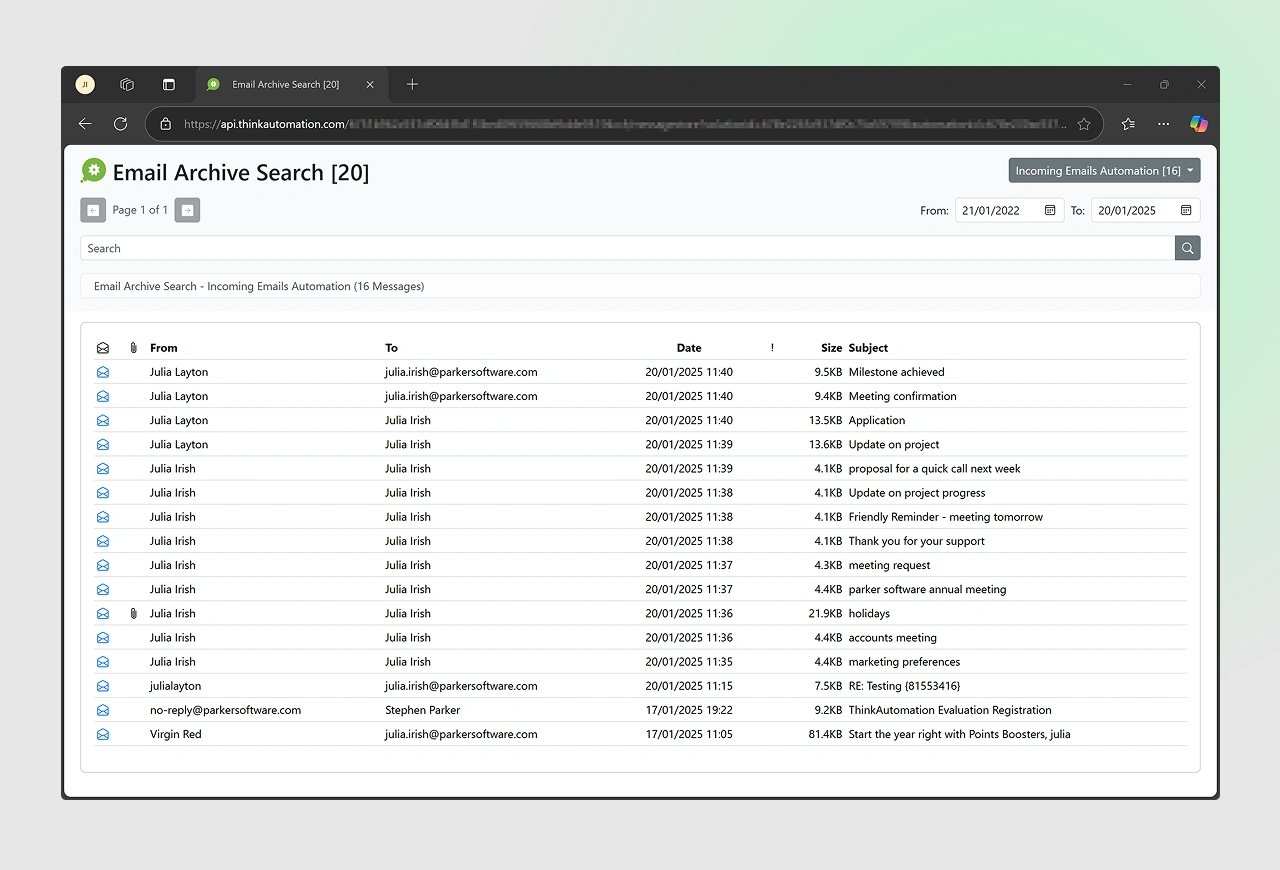
Front-End Email Archive View and Search
Discover the Web Based Message Store Viewer.
Private & Secure
All information remains within your on-premises or private cloud environment, ensuring no data leakage to third-party vendors.

High-Speed Retrieval
Retrieve specific emails or attachments in seconds using full-text indexing and keyword extraction.

Attachment Accessibility
Users can click an email to view full message details and download attachments directly from the browser.

Customizable Interface
The web-based viewer can be customized to align with your corporate branding or to add specific legal disclaimers required for government workflow automation.
ThinkAutomation includes a web-based archive viewer that provides a secure, local, and public web interface for accessing your email archive.
Hundreds of Combinations: Intelligent Workflow Logic
Email archiving can be a simple one-step process, or it can involve a chain of actions as part of a larger FOIA request management system. You define the rules; ThinkAutomation executes them.
Set up your email archiving workflows using conditional processing (If This, Then That). For example:
| IF (Trigger) | THEN (Action) | AND (Secondary Action) |
|---|---|---|
| Sender is a constituent | Save to compliant archive | Tag as 'Public Record' for FOIA search |
| Subject contains 'FOIA Request' | Save to archive | Trigger a legal review notification in Teams |
| Email contains a PDF attachment | Save to archive | Extract PDF text to a searchable SQL table |
| Message contains PII (SSNs) | Save to archive | Flag for automated redaction software review |
Frequently Asked Questions: Email Archiving & FOIA Compliance
In the context of data management, archiving an email is the process of moving a message from an active mail environment (like Outlook Inbox or Gmail) into a separate, long-term, and high-capacity storage system.
It’s distinct from deleting (which removes the data) and backing up (which creates a temporary safety copy). Archiving is about retention and retrieval. An email archive is like a library of digital communication, it ensures that once a message has been stored, it can’t be altered or deleted by a user – creating a ‘legal record’.
The best software for FOIA compliance is one that provides on-premises data sovereignty, full-text indexing, and fixed-cost scaling.
ThinkAutomation is a leading choice because it allows government agencies to archive unlimited mailboxes into a private SQL database, ensuring that public records are searchable and secure without per-user licensing fees.
FOIA request management software automates the discovery phase of a records request. Instead of manually searching individual employee inboxes, the software provides a centralized Message Store Viewer. This allows clerks to search millions of archived emails across all departments instantly, reducing response times from weeks to minutes.
Yes. Modern compliant email archive software like ThinkAutomation can be configured with “If This, Then That” logic to identify Protected Entity Information (PII). While it acts as the discovery engine, it streamlines the workflow for automated redaction software by flagging sensitive data (like SSNs or health records) during the ingestion process, ensuring GDPR and FOIA privacy standards are met.
On-premises archiving ensures Data Sovereignty. For automation in government, keeping data behind a local firewall is often a legal requirement to meet CJIS or HIPAA standards.
ThinkAutomation allows for a private cloud or local server installation, giving the agency total control over the “Chain of Custody” for all archived communications.
Absolutely. ThinkAutomation is a low-code platform. IT teams can define archiving rules, keyword extraction, and database destinations using a visual interface. This removes the need for complex custom coding or a dedicated DevOps team to maintain a government FOIA software solution.